



Does the 2026 Volkswagen Jetta have wireless Apple CarPlay and Android Auto near West Covina, CA?
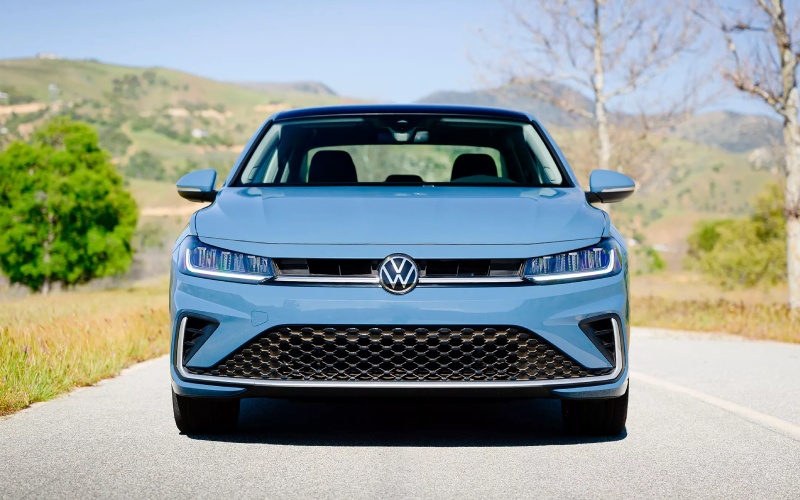
Puente Hills Volkswagen – Does the 2026 Volkswagen Jetta have wireless Apple CarPlay and Android Auto near West Covina, CA?
The 2026 Volkswagen Jetta is built for everyday life around West Covina, where quick hops along Azusa Ave and longer I-10 or SR-60 commutes demand simple, reliable tech. If you use your phone for navigation, music, and messages, you likely want to know whether the new Jetta supports wireless Apple CarPlay and Android Auto—and how that experience actually feels in real-world driving.
Here’s the bottom line in practical terms: the 2026 Jetta offers App-Connect® smartphone integration across the lineup, and select trims include Wireless App-Connect® for cable-free Apple CarPlay and Android Auto. Below, our team at Puente Hills Volkswagen breaks down which trims include which features, how to set them up, and what to consider for daily drives around West Covina, CA.
Which 2026 Jetta trims include wireless Apple CarPlay and Android Auto?
Every 2026 Jetta includes App-Connect® smartphone integration for compatible devices. Wireless functionality—what most shoppers ask about—appears on specific trims. Here’s a quick reference you can use while you shop:
- S: App-Connect® smartphone integration via USB; 8-inch infotainment display and 8-inch VW Digital Cockpit
- Sport: App-Connect® smartphone integration; adds dynamic styling and XDS Cross Differential System
- SE: Wireless App-Connect® smartphone integration plus wireless charging for compatible devices and Remote engine start
- SEL: Wireless App-Connect® smartphone integration with 10.25-inch VW Digital Cockpit Pro (Configurable), Navigation, and VW Premium Audio
If you want truly cable-free Apple CarPlay and Android Auto, we recommend starting your search with the SE or SEL. Prefer a cable and a simpler setup? The S and Sport trims keep it easy with USB-based App-Connect® while still giving you intuitive menus and a crisp 8-inch screen.
What is Wireless App-Connect® like in daily West Covina driving?
Picture this: you leave the house near Shadow Oak Park, jump into your Jetta SE, and by the time you press the start button, your maps, playlists, and messages are already mirrored wirelessly on the center screen. No cables to find. No phone mount gymnastics. That’s Wireless App-Connect®—a seamless handoff from phone to car that feels invisible in the best way.
Because West Covina traffic ebbs and flows—especially by the I-10 and SR-60 interchange—voice commands matter. With Apple CarPlay or Android Auto, you can start a route to Plaza West Covina, pull up coffee stops on Amar Rd mid-commute, or send a quick voice-dictated message without reaching for your phone. It’s the kind of tech that reduces clutter and helps you keep your attention on the road.
How to set up wireless and wired phone mirroring
Setup takes just a few minutes, and once paired, the Jetta reconnects automatically. Here’s how to get started.
- Start your Jetta and park safely. Keep the vehicle in Park.
- On your phone, turn on Bluetooth and Wi-Fi. Wireless mirroring needs both.
- On the Jetta’s touchscreen, open App-Connect® and select your platform—Apple CarPlay or Android Auto.
- Follow the on-screen pairing prompts. Confirm permissions on your phone.
- Choose to allow wireless CarPlay or Android Auto to connect automatically in the future.
Prefer a cable or driving a Jetta S or Sport? Plug into the USB-C port, then select the App-Connect® icon on the touchscreen. Your apps appear in seconds, and you can charge and mirror at the same time.
Charging and battery life tips for phone-first drivers
Wireless mirroring can use more battery than Bluetooth streaming alone. The Jetta is set up to make that easy to manage:
- SE and SEL: Include a wireless charging pad for compatible devices—drop your phone on the pad, and it tops up while you drive.
- S and Sport: Offer USB-C ports for reliable, fast charging while using wired App-Connect®.
- Any trim: For longer drives—say a City of Industry to Pasadena loop—plug in via USB-C to keep the battery near 100 percent.
Helpful note for hot SoCal days: keep your phone out of direct sun on the dash. Using the console’s charging pad or a shaded storage spot maintains optimal charging speeds and helps prevent thermal slowdowns.
How Jetta tech works together—beyond your phone screen
Phone mirroring is just one piece of the Jetta’s confident tech package. On SE and SEL, Wireless App-Connect® pairs naturally with the Digital Cockpit experience—especially the 10.25-inch VW Digital Cockpit Pro on SEL—making it easy to keep core info at a glance. And with IQ.DRIVE® standard, features like Travel Assist and Emergency Assist can support your situational awareness when traffic compresses around Grand Ave or the 57 interchange. Use steering wheel buttons to manage volume or skip tracks, and rely on built-in voice control or your phone assistant to minimize distraction.
If you choose SEL, you also have built-in Navigation and VW Premium Audio. You can go back and forth between the native VW map and CarPlay or Android Auto maps—whichever view you prefer for that day’s drive or the canyon detours you might take above Azusa.
Troubleshooting quick tips
Most connections just work. If you run into hiccups, try these steps:
- Wireless won’t connect: Confirm Bluetooth and Wi-Fi are on, then delete and re-pair the Jetta from your phone’s Bluetooth list.
- Audio cuts out: Remove any old phones saved in the Jetta that you no longer use to reduce pairing conflicts.
- App not showing: Update your phone’s OS and the specific app. Some apps limit display while the car is moving.
- Slow charging: Use a high-quality USB-C cable or the built-in wireless charging pad on SE and SEL.
- Multiple drivers: Set your driver profile in the Jetta and pair one phone at a time during initial setup to establish priority.
Is wireless worth it for West Covina shoppers?
If you frequently hop between errands on Amar Rd or find yourself in the SR-60 carpool lane with limited time to get situated, wireless Apple CarPlay and Android Auto feel like a quality-of-life upgrade. It keeps the cabin tidy, onboarding is painless, and the automatic reconnection makes short trips as simple as long ones. If you prefer a just-plug-in-and-go experience—or want to guarantee the fastest possible phone charging—the Jetta S or Sport with wired App-Connect® will also serve you well.
Other ownership considerations we help our Jetta buyers solve
Our goal is to make your first weeks of ownership simple. We’ll show you how to pair your phone, customize the Digital Cockpit, and adjust driver-assistance settings so the car feels like yours from day one. Because every new 2026 Jetta includes Carefree Coverage on all new 2026 Jetta vehicles and a 3-year Safe & Secure plan, we can also help you activate myVW, set up service reminders, and understand what’s covered at 10,000 and 20,000 miles. And when your schedule is tight, our VW Service Xpress lane can handle basic maintenance without an appointment.
Frequently Asked Questions:
Does the base 2026 Jetta support Apple CarPlay and Android Auto?
Yes. The Jetta S includes App-Connect® smartphone integration for compatible devices via USB. Wireless App-Connect® is offered on select higher trims.
Which 2026 Jetta trims include wireless Apple CarPlay and Android Auto?
Wireless App-Connect® is included on trims such as SE and SEL. The S and Sport provide App-Connect® via USB. Visit us to review current inventory details.
Do I need a data plan or the in-vehicle Wi-Fi Hotspot to use CarPlay or Android Auto?
Your phone uses its own cellular data for navigation and streaming. The available Wi-Fi Hotspot is separate and designed for passenger device connectivity.
Can I pair more than one phone?
Yes. You can save multiple phones. To reduce connection conflicts, set a primary phone in your driver profile or connect one phone at a time when starting out.
Will CarPlay or Android Auto still work in areas with spotty reception, like certain canyon roads?
Maps you already loaded continue to display, but live traffic and new searches need data. We recommend starting navigation before you head into low-signal areas.
Is it safe to use talk-to-text while driving?
Voice assistants minimize distraction, but always use them responsibly. Keep your focus on the road and comply with local hands-free laws.
How does Wireless App-Connect® affect phone battery life?
Wireless mirroring can use more battery than a simple Bluetooth connection. Use the SE or SEL’s wireless charging pad or a USB-C cable on longer drives.
Apple CarPlay is a trademark of Apple Inc. Android Auto and Google are trademarks of Google LLC. Always pay careful attention to the road, and do not drive while distracted. Not all features are available on all operating systems. Message and data rates may apply. App-Connect® features require compatible device, operating system, and mobile apps.
Want to feel the difference between wired and wireless for yourself? Visit Puente Hills Volkswagen in the City of Industry—just minutes from West Covina—for a hands-on demo in the 2026 Jetta. We’ll pair your phone, walk you through Wireless App-Connect®, and help you choose the trim that fits your commute and weekend plans. Take Monterey Blue Pearl for a spin or compare interiors—the decision is always easier once you try the tech in real traffic.
Ready to get started? Stop by our showroom on Gale Ave or contact us to schedule a test drive. Our team will have a Jetta set up and waiting so you can see how seamlessly your everyday apps come to life on the road.
0 comment(s) so far on Does the 2026 Volkswagen Jetta have wireless Apple CarPlay and Android Auto near West Covina, CA?